
A car lift for mobility scooter travel takes over the part of a trip that asks the most of you: getting the scooter into the car and back out again. With the lift doing the raising and lowering, loading becomes a set of steps you follow the same way each time.
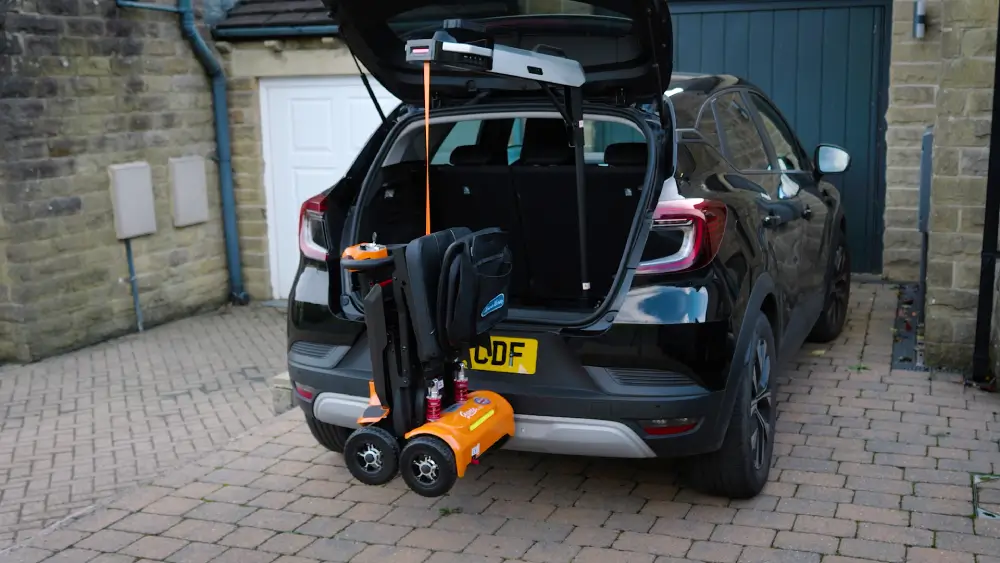
Getting there takes a little preparation. A lift has to work with two things you already own, your scooter or powerchair and your vehicle, and it helps to know your routine before the first outing. This guide covers how to check the weight and fit, what to bring to your dealer, and how to load and unload safely. If you’re still comparing lift types, start with Monarch’s wheelchair and scooter car lifts page, then come back here to plan your setup.
Signs a Car Lift Could Make Loading Easier
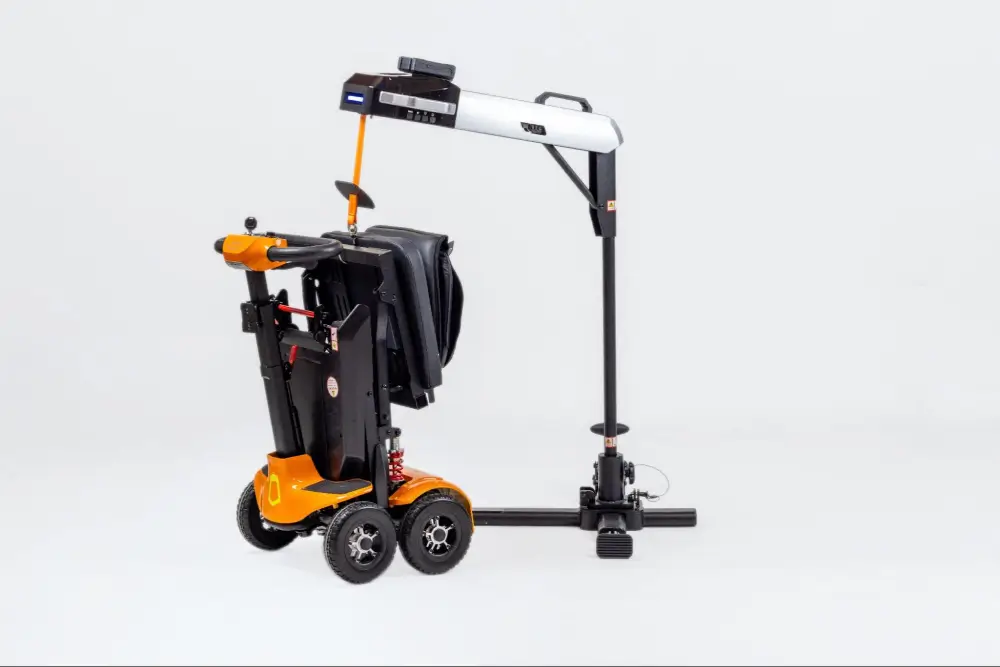
Even a lightweight folding scooter still has to be lifted, and some riders would rather hand that job to a machine. A car lift is worth considering if any of these sound familiar:
- You’d prefer not to lift a scooter weighing 30 lbs or more into a trunk several times a day.
- You often travel alone and don’t always have someone to help load the scooter.
- You make frequent stops, so loading and unloading happens again and again on the same outing.
- Your vehicle has a high cargo floor, such as an SUV, which means lifting the scooter higher.
- You want a consistent, repeatable way to load that works the same every time.
If a few of these apply, the steps below will help you figure out whether a particular lift fits your setup.
Step One: Match Your Device’s Weight to the Lift
Every lift has a maximum lifting capacity, and your device needs to fall within it. The Atlas 4 is listed with an 88 lb lifting capacity, and Monarch describes it as suited to lightweight folding mobility scooters and electric wheelchairs.
Use the weight of the device you’ll actually be lifting. For a scooter, that usually means the weight with the battery installed, plus anything attached to it. Monarch lists these weights with the battery for its folding scooters:
- Genie Ultralight: 31 lbs
- Supa Carbon Lite: 33 lbs
- Smarti Plus: 39 lbs
- Genie: 40 lbs
- Genie Auto: 43 lbs
Each of these falls within the Atlas 4’s listed capacity. If you own a different scooter or powerchair, find its listed weight in the owner’s manual or on the manufacturer’s product page and compare it to the lift’s capacity before you buy. Remember to count accessories such as a basket or bag if they’ll stay on during lifting, and never load a device that exceeds the lift’s rated capacity.
Planning a Scooter and Lift Together
If you haven’t bought a scooter yet, it’s worth thinking about the lift at the same time. Look at each model’s weight with the battery and its folded dimensions alongside its features, since those two numbers decide how well it pairs with a lift and a trunk. A lighter scooter leaves more room under the lift’s capacity for a basket or bag, and a smaller fold leaves more trunk space for everything else you carry. Your dealer can show you both the scooter and the lift together, so you can see how they work as a pair before you commit.
Step Two: Check Your Vehicle Before You Order
Weight is only half the picture. The lift also has to fit your vehicle, and trunk layouts vary a lot from one make and model to the next. Monarch strongly recommends consulting with your dealer to confirm vehicle compatibility before ordering an Atlas 4.
A little measuring ahead of that conversation helps. Start with the trunk or cargo area where the lift and scooter will sit, and note the height of the trunk opening and how much floor space you have once the scooter is folded. Check your scooter’s folded dimensions, listed on each Monarch product page, against that space. Then compare the lift’s own listed dimensions, including its folded size, so you know it will store in the vehicle when it isn’t in use.
Think about what else rides in the trunk, too. Groceries, luggage, or a stroller all compete for the same floor space, so measure with your usual load in mind.
If you plan to use the lift in more than one car, repeat these checks for each vehicle. A lift that fits your own SUV may not fit a smaller sedan, so confirm fit for every vehicle you expect to use.
What to Bring to Your Dealer Conversation
Having the details ready makes the compatibility check faster and more accurate. Gather:
- The make, model, and year of each vehicle you plan to use
- Your trunk measurements, or a few photos of the cargo area with the seats in their usual position
- Your scooter or powerchair model and its listed weight with the battery
- How often you expect to use the lift in a different vehicle
Step Three: Build a Safe Loading Routine
Once you have a lift that suits your device and vehicle, a consistent routine makes each trip easier and helps you load safely. Always follow the instructions that come with your lift and your scooter, since they cover details specific to your equipment. As a general approach:
- Fold the scooter first: Lift the scooter in its folded, travel-ready position so it takes up less space in the trunk.
- Remove loose items: Take off anything that could shift or fall, like bags or a basket, and set them in the car separately.
- Clear the area: Make sure there’s room around the trunk and that no one is standing in the lift’s path.
- Operate from a safe position: The Atlas 4 runs by remote control or with the buttons on its side panel, so you can stand back while it lifts and lowers.
- Secure the scooter: Once it’s in the trunk, check that the scooter is stable and won’t slide while you drive.
Practicing at home a few times before a longer trip gives you a chance to get comfortable with each step. Your dealer can also walk you through setup when you take delivery.
Unloading at Your Destination
Unloading is the same routine in reverse, and a few habits help it go smoothly. When you can, park where there’s open, level ground behind the trunk, with enough room for the scooter once it’s lowered. Lower the scooter fully to the ground before you detach it, then unfold it and reattach any basket or bag you removed. It’s also a good moment to glance at your scooter’s battery level before you set off.
Keeping Your Lift Ready for the Road
A powered lift needs power, so build charging into the same routine you use for your scooter. The Atlas 4 has a battery power indicator, so a quick check before you leave tells you whether it’s ready. If you use the lift often or take long trips, Monarch offers an Atlas4 Spare Battery you can keep charged as a backup.
For evening outings, the Atlas 4’s integrated spotlight helps when you’re loading in a dim parking garage or a driveway after dark. Full specifications, including dimensions and battery details, are listed on the Atlas 4 product page.
Frequently Asked Questions
Talk With a Dealer About the Right Setup
A lift that works well comes down to three checks: your device’s weight, your vehicle’s space, and a loading routine you’re comfortable with. Once you have those answers, the conversation with your dealer gets much simpler. Every lift and vehicle combination is a little different, so a hands-on check is the most reliable way to know a setup will work for you. Find a local Monarch Mobility dealer to confirm vehicle compatibility and see the lift in action before you order.